1. Home
  2. Family
  3. Training
  4. Unsubscribe from a training (Family)

Unsubscribe from a training (Family)

You can subscribe or unsubscribe an athlete from a training using the “Event Status”. The default setting for Event Status is “Available”.

Go to MY SCHEDULE in the menu on the left. You will see all upcoming appointments for your assigned athletes. Use the various filter functions to display only the trainings you want to see.

Click on the status under “Event Status” to change the status for this training.
If you want to unsubscribe the athlete from a training, select the status “Excused”.
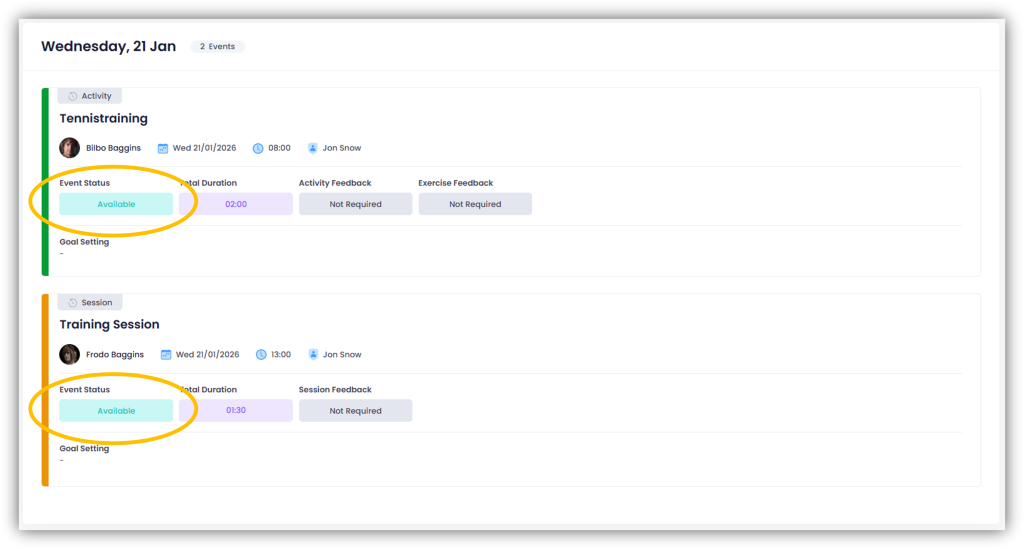
If you want to unsubscribe an athlete from a session, all activities in that session will be set to “Excused” by default.
However, you also have the option of changing the status for individual activities within the session. To do this, uncheck the “All Session” option.

Important: You can change the status of an activity or session up to one day before the training (midnight). This is stored as the default in the system. However, the club admin can define the period during which a change of status is still possible.

Updated on January 21, 2026