Using this dashboard, you can export your custom user data as a CSV file.
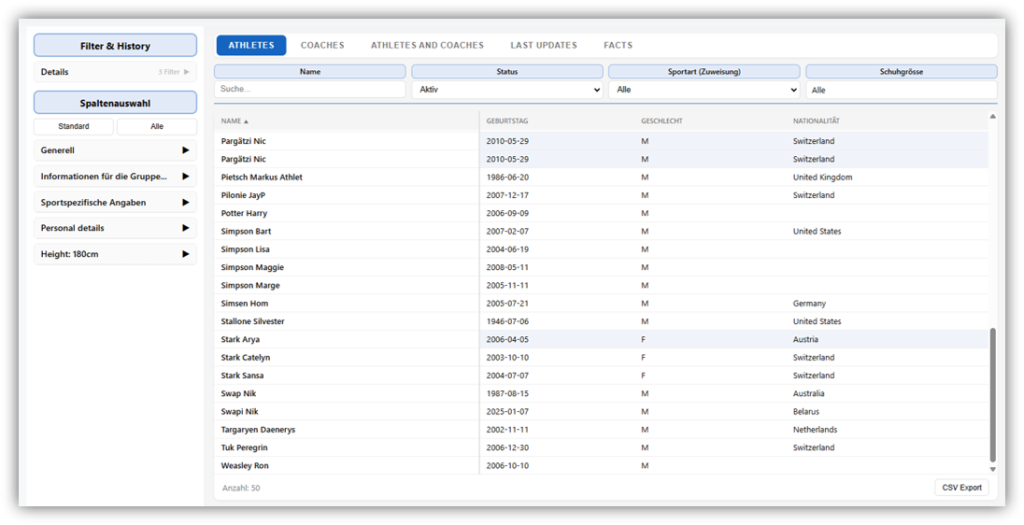
On the left, under “Spaltenauswahl” you can choose all the available columns from which you want to export your users’ data. Under “Generell”, you’ll find all the standard information recorded in the profiles of athletes and coaches. If your club uses the “Fields Configurator” to create custom fields for queries, these are also available for selection here.
In the upper section “Filter & History”, you can specify which data to filter by, allowing you to filter the table according to these criteria.
The “Nur historische Einträge” slider allows you to display all historical entries for a field, if available. Historical entries are only available for fields created with the Fields Configurator where the “Track changes” option has been enabled.
Athletes
This section displays all of the club’s athletes, along with the selected columns. The previously defined filters are available at the top of the page. Below the list is the “CSV button”, which allows you to download the list as a CSV file.
A row highlighted in blue indicates that historical entries are available. Clicking on the row displays the corresponding historical entries for the respective athlete.
Coaches
This page displays all of the club’s coaches. You can also configure the columns to be displayed and the filters for coaches. Depending on how you use the “Field Configurator”, the available columns may differ from those for athletes. This list can also be downloaded as a CSV file using the “CSV button”.
Athletes and Coaches
This view lists athletes and coaches together.
Last Updates
The most recent changes to the fields in the field configurator are displayed here. You can set the time period in the upper section.
Facts
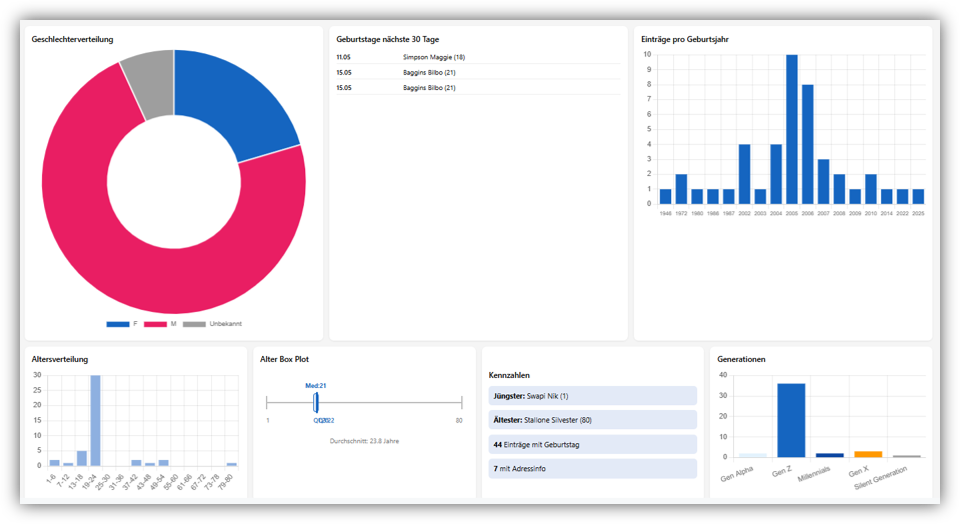
Here you’ll find various statistics about your athletes or coaches. The data displayed includes gender and age distribution, birth years, generations, and information about upcoming birthdays.