
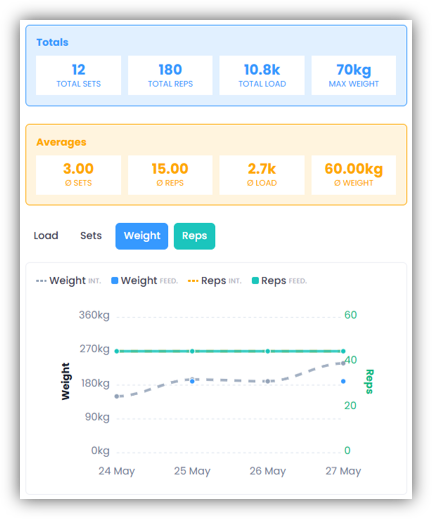
If your coach has scheduled trainings for you that include the same exercise, or if you’ve created trainings yourself that include the same exercise and have recorded details such as sets, reps, weight, or time, you can view a graph showing how these values have changed over the last ten trainings.
Either open the exercise list on an activity’s overview page or go directly to the “Exercises” tab. Click the “chart icon” next to the desired exercise.
At the top, you’ll see a graph showing the statistics for the last ten trainings of this exercise. Below that, you’ll find all ten sessions with their details. Additionally, the changes between the individual sessions are clearly displayed.
Transfer values to newly scheduled training
If you’re planning your own trainings and have added an exercise, you can click “Edit Exercises” and then the “gear icon”. Under “Exercise History”, you can import the values from a previous session (sets, reps, weight, and time) into your newly planned training. To do this, click “Copy” next to the desired session. You can then choose between:
- “Intended” – the default values
- “Feedback” – the values you actually reported
The selected values are automatically applied but can be adjusted individually at any time.